The room your chart lives in
Jackson · November 9, 2026 · 9 min read

Photo: Denis Sebastian Tamas / Unsplash
Well-being and Atlas, which by definition is more than just a map. It's a navigational toolkit. It is only part of the process here, of the triangle of self, place and relationship.
So it was a natural extension to have a fully capable astrological and Human Design calculation suite, fluidically connected to and from the map, with the ability to focus on either one at the same time while they interact with each other.
The other half of the atlas
The map answers where: where a planet runs angular, which city sits under which line. The chart answers what: what is in the chart, what rules what, which aspect is doing the work.
The Chart Lab is where the what lives. It is a full-screen chart page for astrology and Human Design, built for people who read charts for a living as much as for people reading their own. Any signed-in account can open it.
One example runs through this post: a demo chart, born 15 June 1990 in London. It is not a real person. It is the chart we test with.
Three faces
Every chart opens with three ways to look at it. You switch with one tap.
The wheel is the natal chart: house cusps, the aspect web in the middle, and aspects to the angles. Tap a planet, a house, a sign or an angle and its reading opens beside the chart. Hover shows a small card at the pointer. A click pins the full reading.
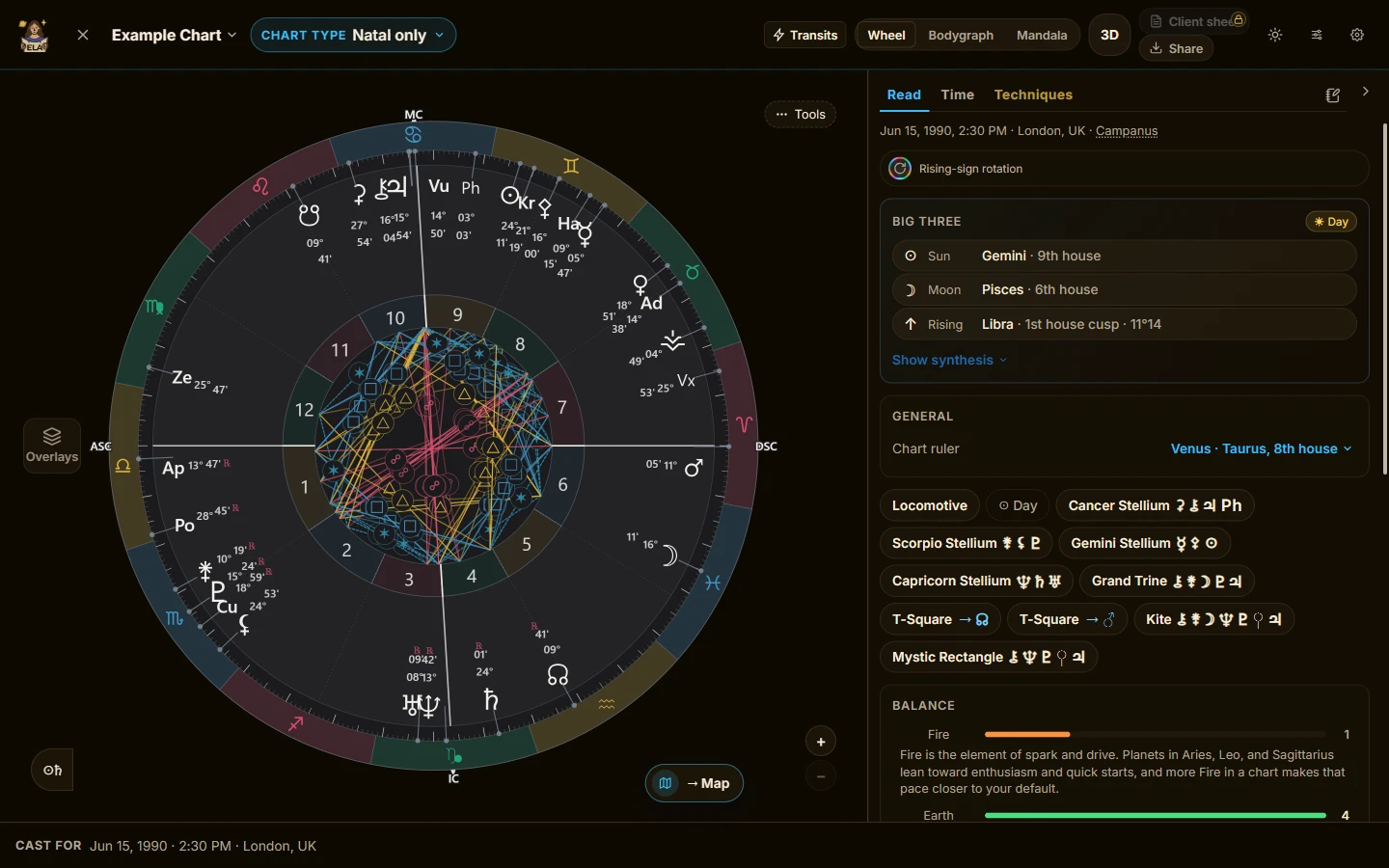
The wheel. In the demo chart, Saturn sits in Capricorn, retrograde, in the fourth house.
The bodygraph is the same person read through Human Design. Design and Personality activations run down either side, the way the system draws them. Tap a gate, a center or a channel and its reading opens in place.
The mandala lays the gates around the zodiac. The I Ching band and the zodiac band switch on and off, and Pro adds a ring of the amino acids around the outside.
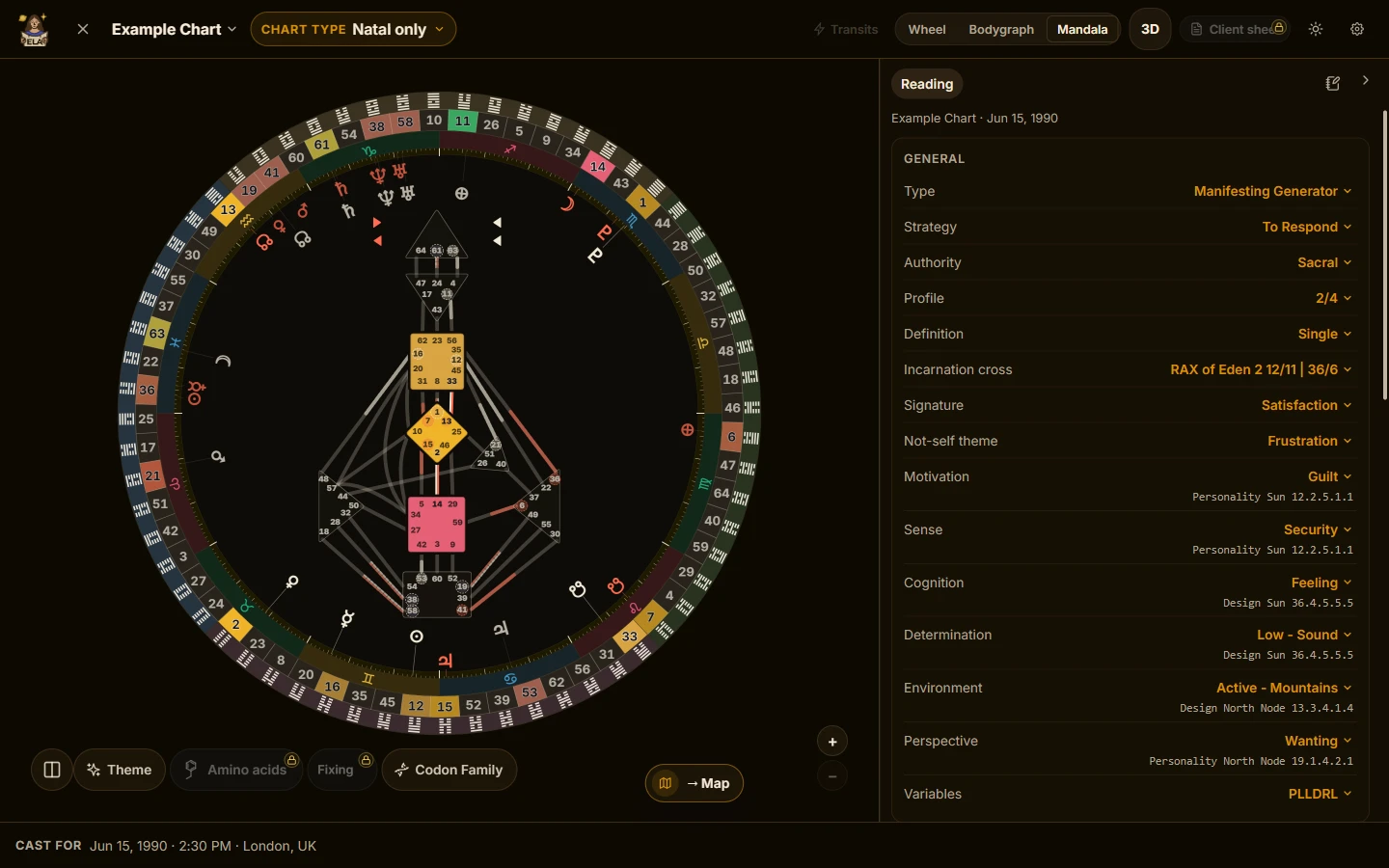
The mandala. Three of nine centers defined in this chart.
In 3D, in your hands
Each face also has a 3D view. The wheel becomes a sphere you can turn. The bodygraph and the mandala become the Solid: the graph standing between its Personality ring above and its Design ring below.
You move it the way you would expect:
- Drag to turn it. Seen from above, a drag pans and the rim spins the chart.
- Pinch or scroll to zoom. Two fingers pan.
- Double-click a planet to fly to it, or the empty sky to reset the view.
- On a keyboard, the arrows move the camera and + and − zoom.
The demo chart in 3D: the sphere turned and zoomed, then the Solid.
Pin a planet on the sphere and its four lines (AC, DC, MC, IC) draw across the globe inside it. It is a small preview of the map, inside the chart.
The flat faces take the same hands: pinch to zoom, drag once zoomed. On any screen, press and hold a planet for a ring of actions: star it, explain it, solo it, hide it, add a note, or take it to the map.
The shelf
The wheel takes overlays from the Layers shelf. Aspect patterns draw the grand trines, T-squares and the rest as shapes. Antiscia add the solstice mirror points. Fixed stars and the Hermetic Lots live in the Bodies list, switched on one at a time, so you add the star that touches your Venus and not a sky full of names.
Overlays stack, three at once on a desktop and one on a phone. That cap is on purpose. A wheel carrying six overlays is not a richer chart.
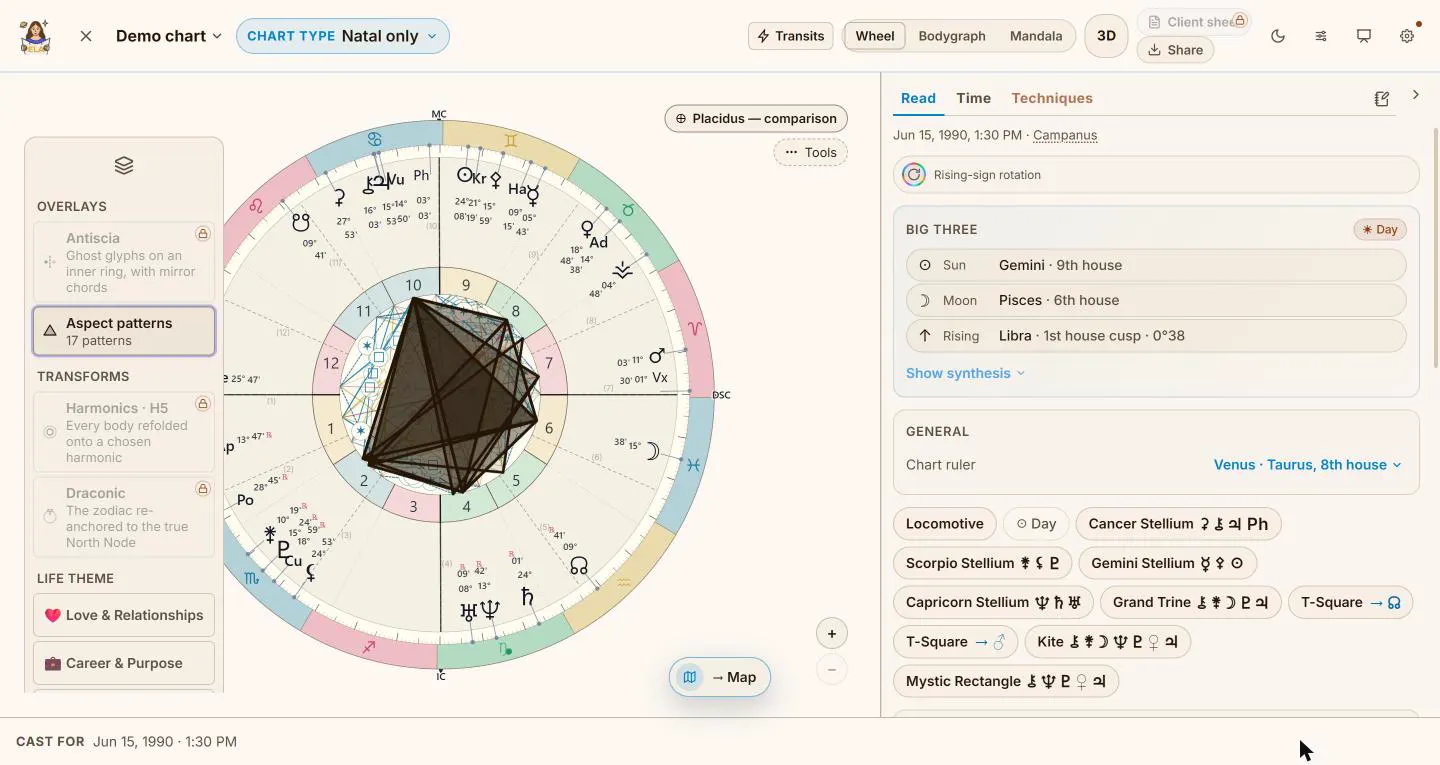
The shelf with Aspect patterns on: 17 patterns in the demo chart, drawn as shapes.
Transforms are different: harmonics and draconic replace the positions on the wheel rather than adding ink, so only one can be on at a time.
Houses, without the argument
Everyone wants to see their chart in another house system. Nobody wants it quietly re-cast because they clicked something.
So the comparison is a ghost ring. Your chart stays as it was. A second, faded set of cusps lays over it, and you see what moves. Turn it off and nothing has changed.
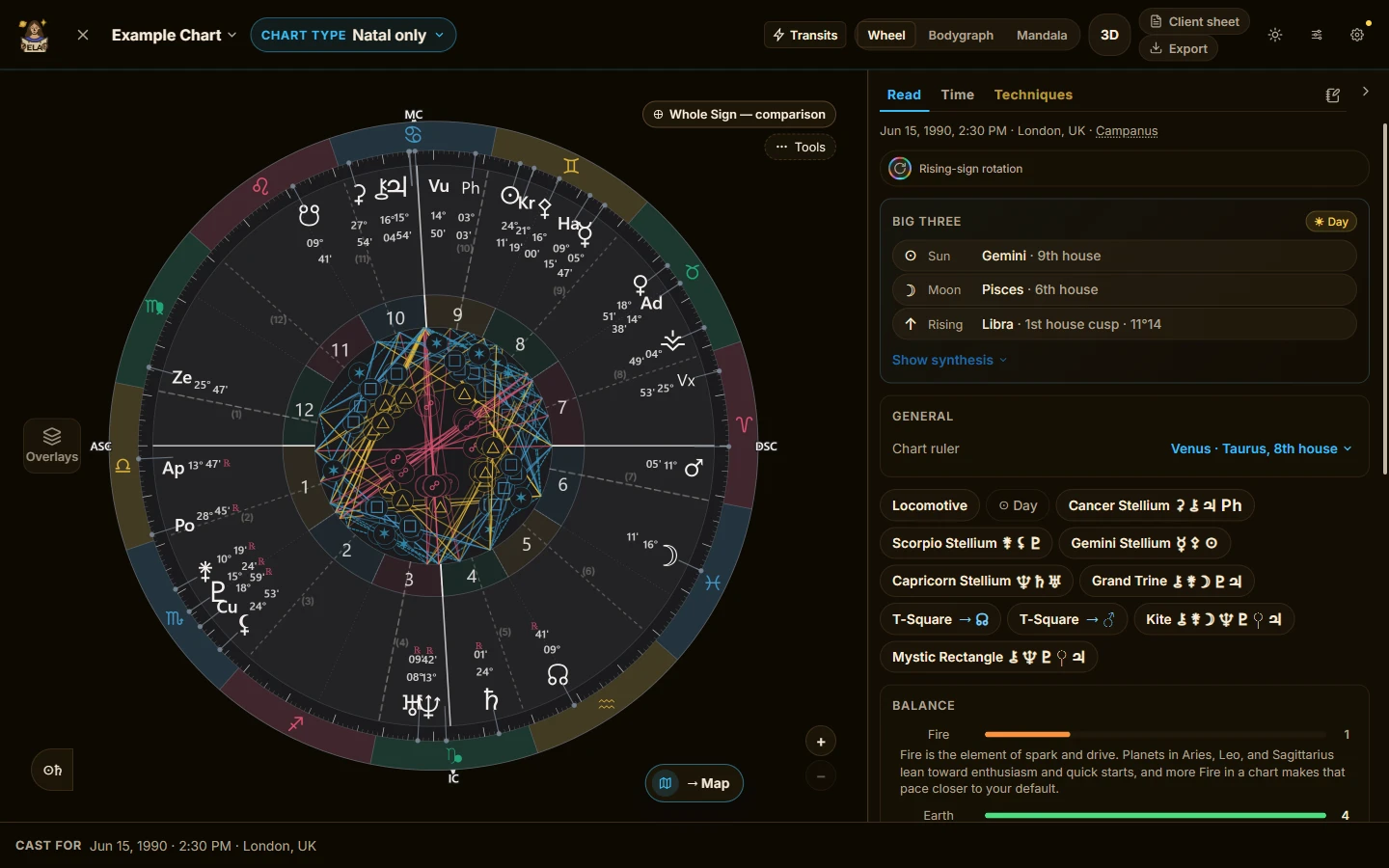
The ghost ring: Whole Sign laid over the chart without re-casting it.
The moving sky
Around the natal wheel you can put a second ring:
- today's sky, the transits
- the progressed chart
- a true solar arc (the progressed Sun's real arc, not the one-degree-a-year shortcut)
- a return: solar, lunar, Saturn, Jupiter, Chiron, or the Uranus opposition
- a partner's chart, for synastry, with the composite available beside it
- a moment you chose, cast for a place
- the Human Design Design chart, alone or as a ring around the Personality chart
The dock under the chart steps the clock by a day, a week, a month or a year, or plays the sky forward by the hour, day, week or month. The ring moves as you go.
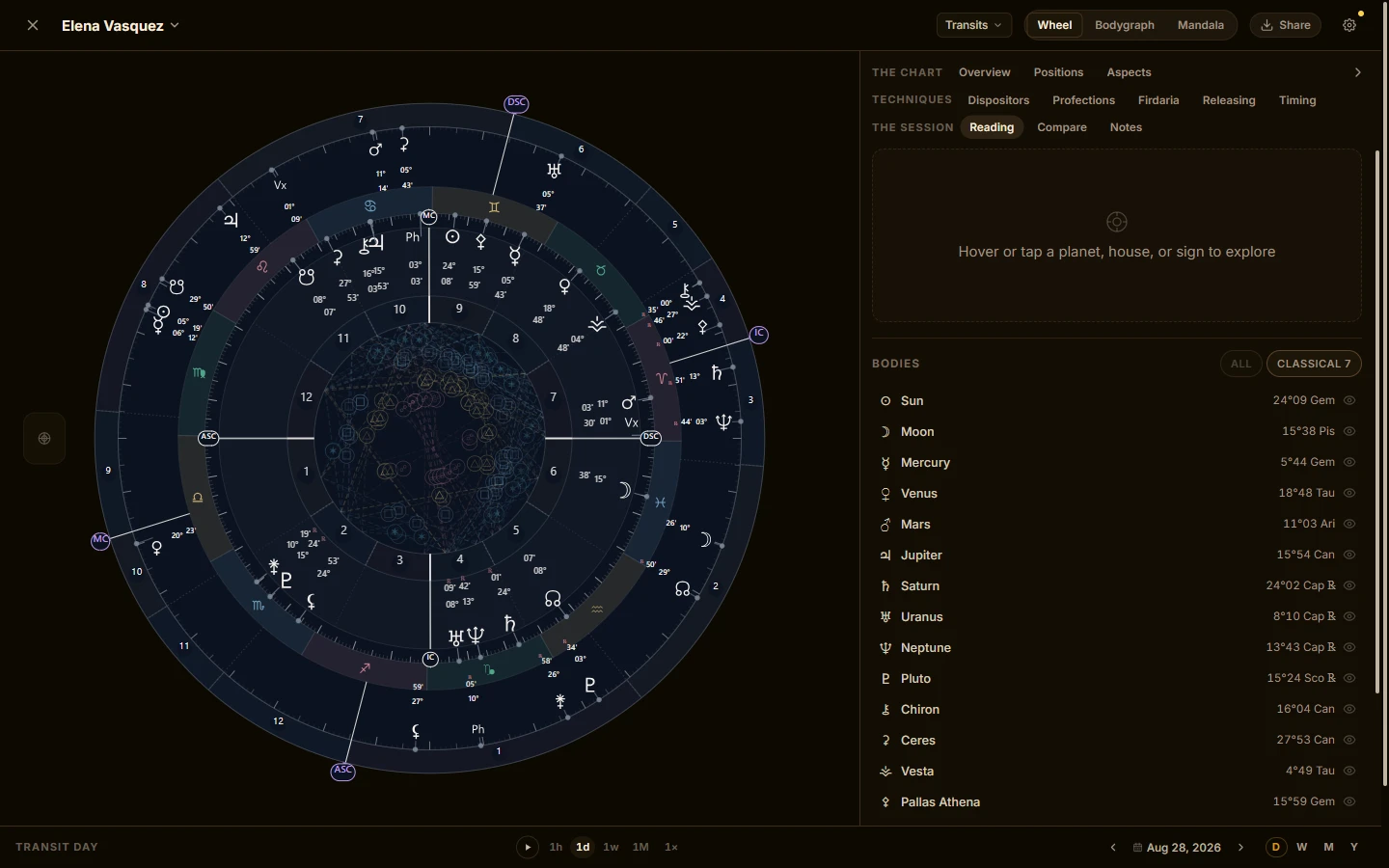
Transits as a second ring, with the clock in the dock below.
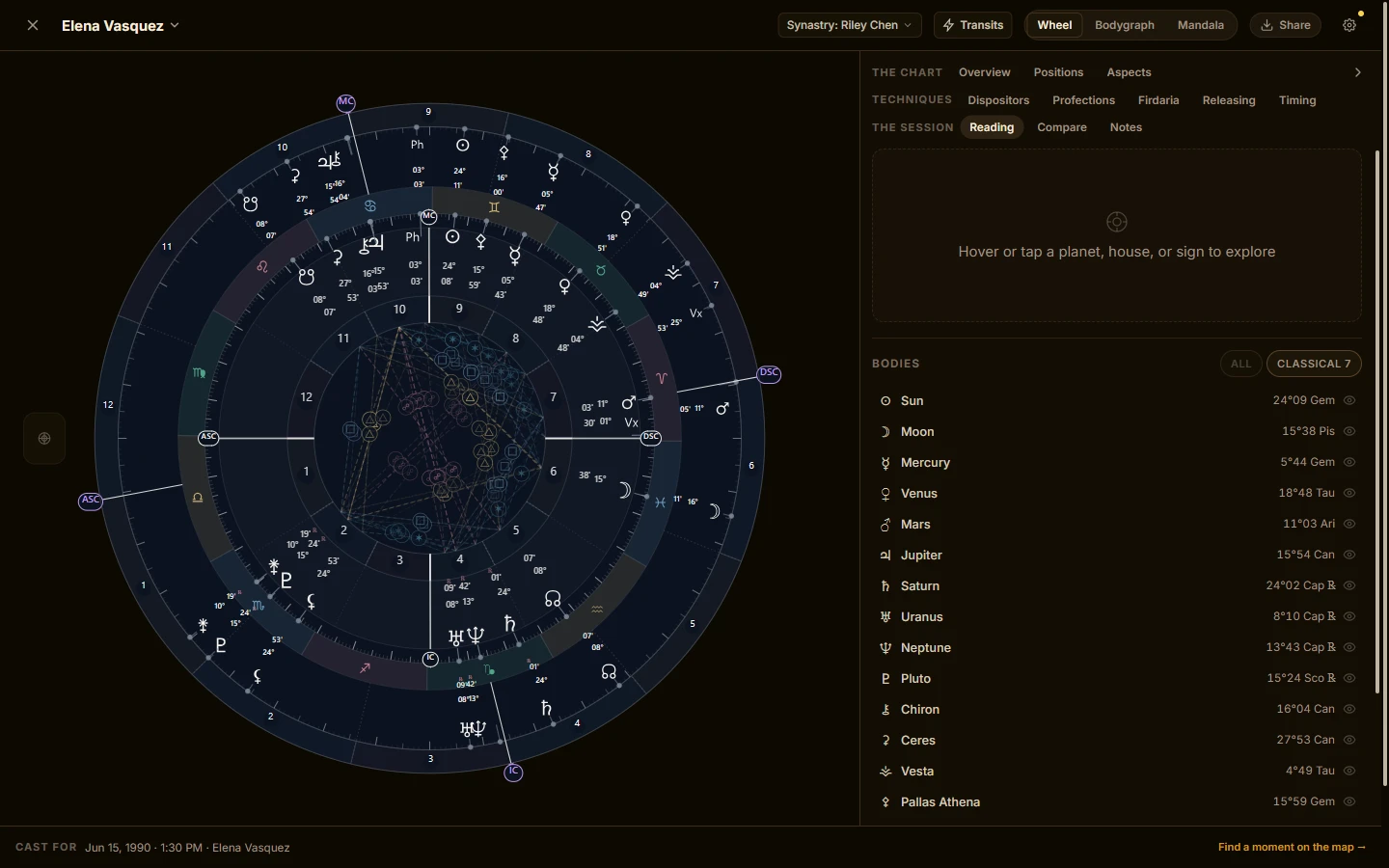
Synastry: a partner's chart around the natal wheel.
The Timing tab asks the sky a question, such as when does Saturn conjunct my Sun?, and lists the dates. Choose any result and the chart opens on that moment. That search has its own post, Ask the sky when.
The Transits tab reads the current sky against the chart, on both the wheel and the bodygraph, with a timeline of when each contact begins, peaks and ends.
The techniques
The Techniques group holds the methods working astrologers reach for, each on its own tab:
- Dispositors: the tree of who rules whom
- Profections: the year's activated house and its lord
- Firdaria and zodiacal releasing: the classical time-lord periods, with releasing's peak periods marked
- Midpoint tree: every midpoint, with a 90° dial
- Primary directions: both methods and the converse
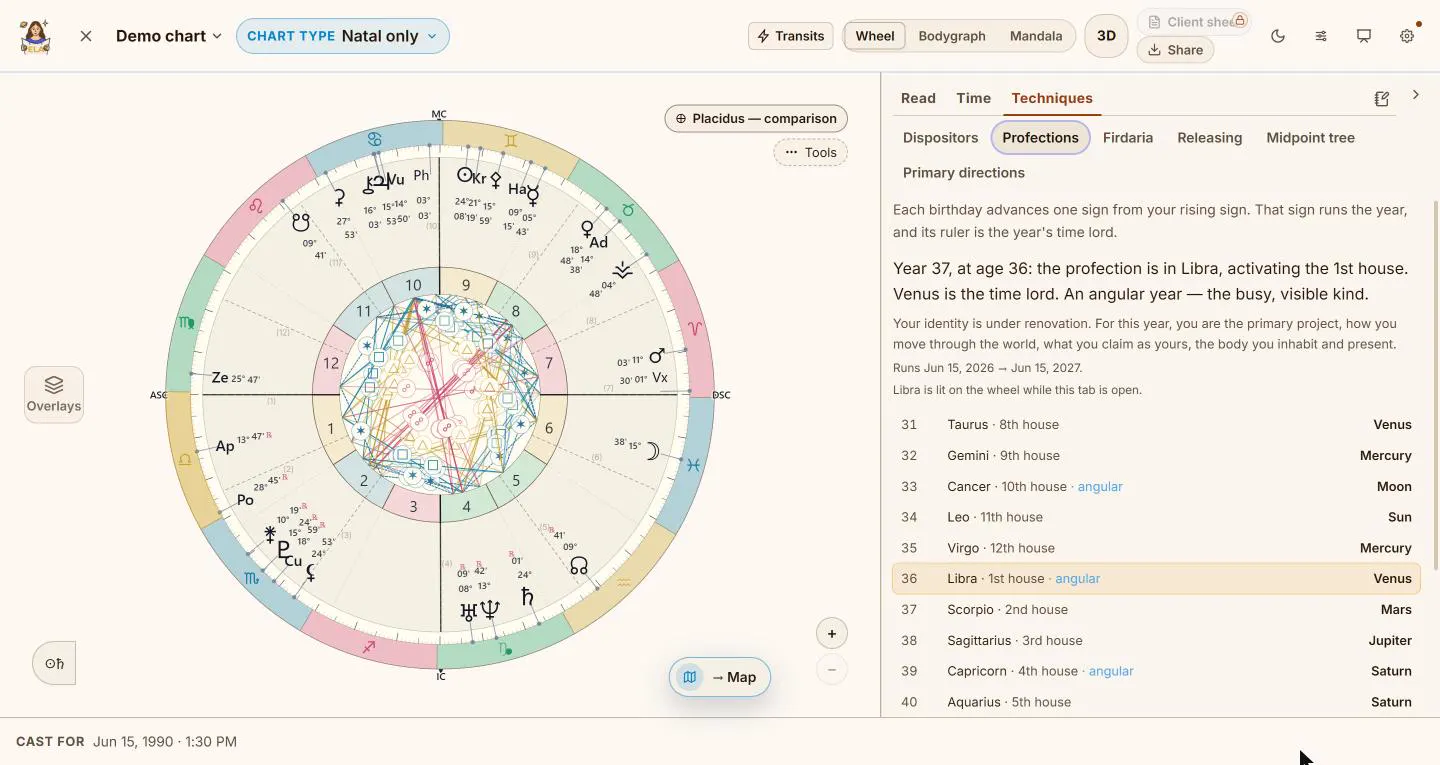
Profections: the year's sign, house and time lord, with Libra lit on the wheel.
There is more on each in the techniques practitioners reach for.
When a birth time is uncertain, Narrow the time lets you scrub through a time range and watch the rising sign, the angles and the bodygraph move, with life events to shortlist the likely windows. It never picks a time for you, and a saved time stays marked as approximate.
Human Design, in the same room
Human Design has its own full weight here, not a tab. The bodygraph reading is one scrolling panel: type, strategy, authority, profile, definition, cross and the rest, then the centers, channels and gates. Tap a row and the graph lights the same thing.
Life themes dim what is outside one area of life, on the wheel and on the bodygraph, the same way the map does.
Put three to five people together and it becomes a Team Map: the group's Human Design read as one. It is the same view the map uses, so the Lab and the map can never disagree.
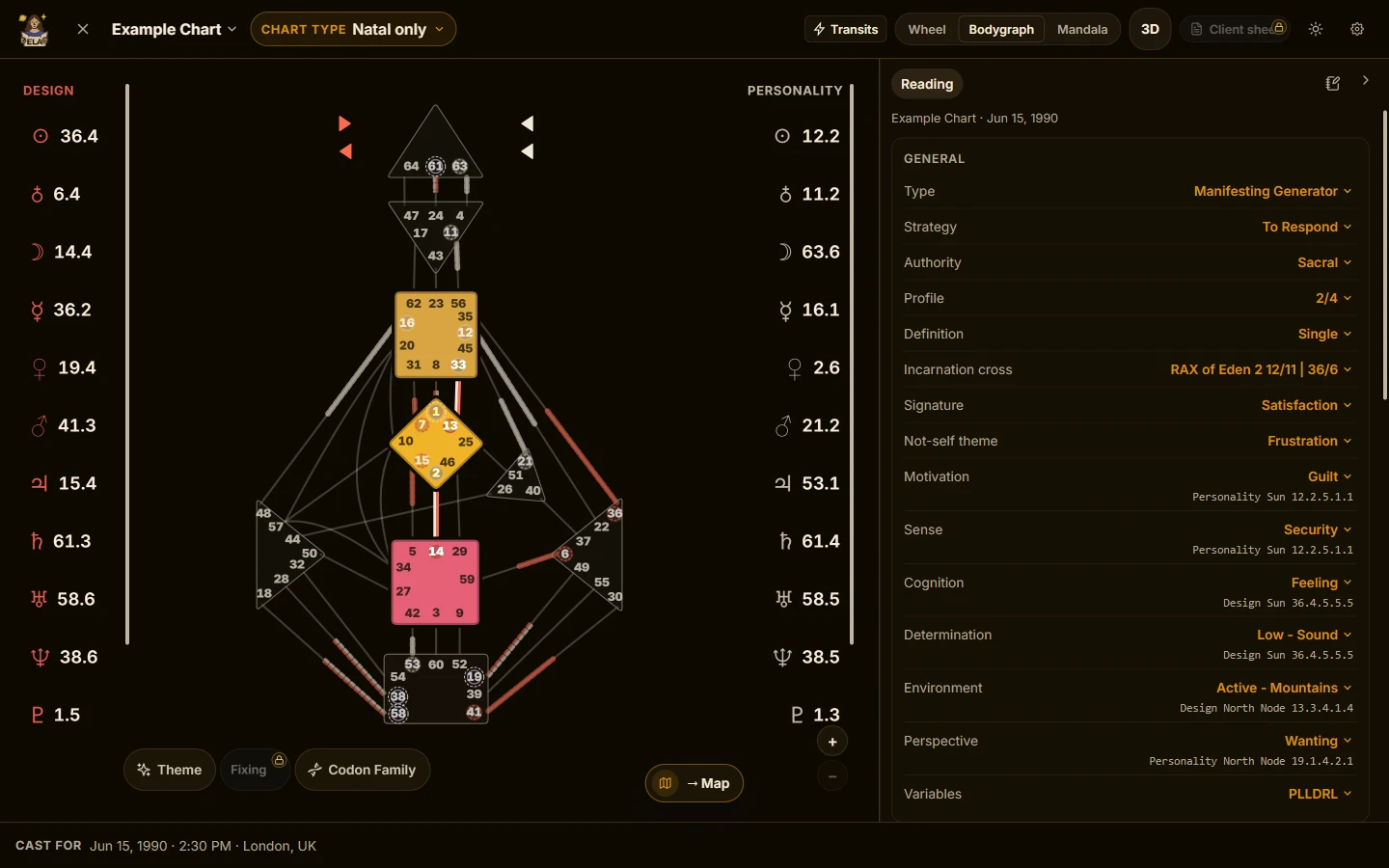
The bodygraph. Design activations on one side, Personality on the other.
Cast for a place
Pick a city and the Lab casts the chart for it. The houses and the four angles move. The readings re-key to the new houses. The wheel always names the place, because a relocated wheel looks exactly like a natal one. Human Design keeps the birth chart, since gates come from the planets, not the place.
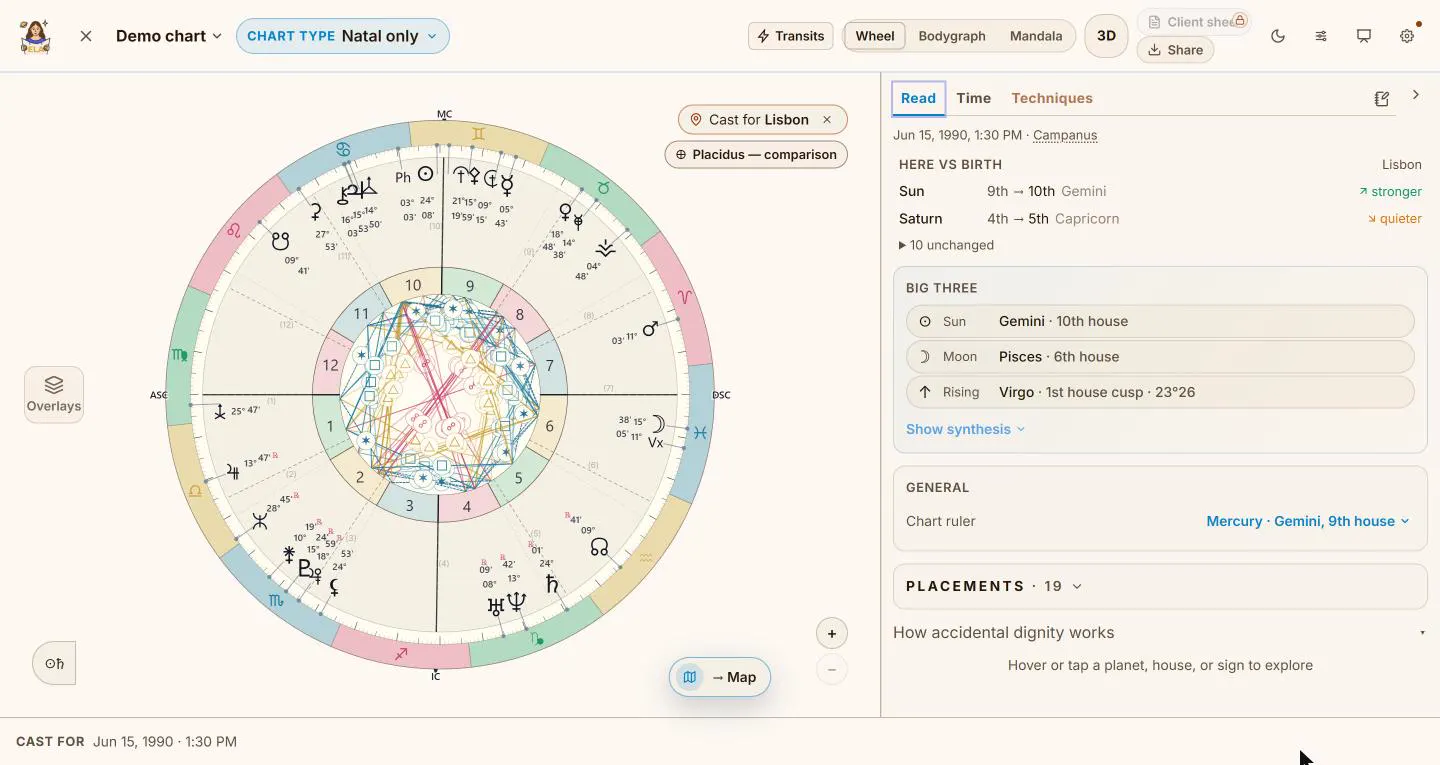
Cast for Lisbon. The Sun moves up into the 10th house; Saturn into the 5th.
To the map and back
This is where the two halves meet.
Solo the bodies you care about in the Lab, press the map button, and the map opens on the same chart, in the same mode, at the same moment, showing those bodies and hiding the rest. A chosen place and a life theme travel too.
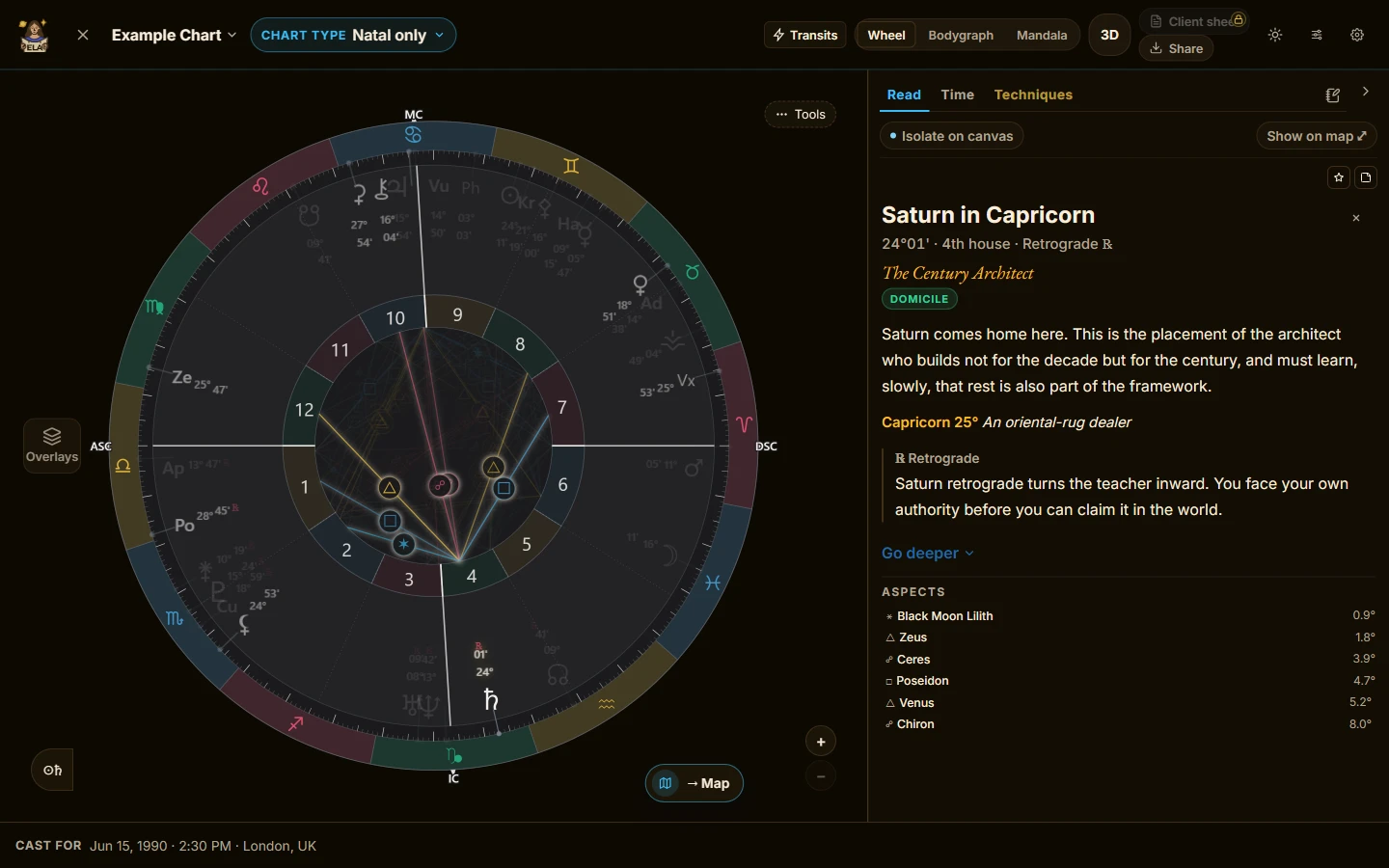
In the Lab: Saturn picked out on the wheel.
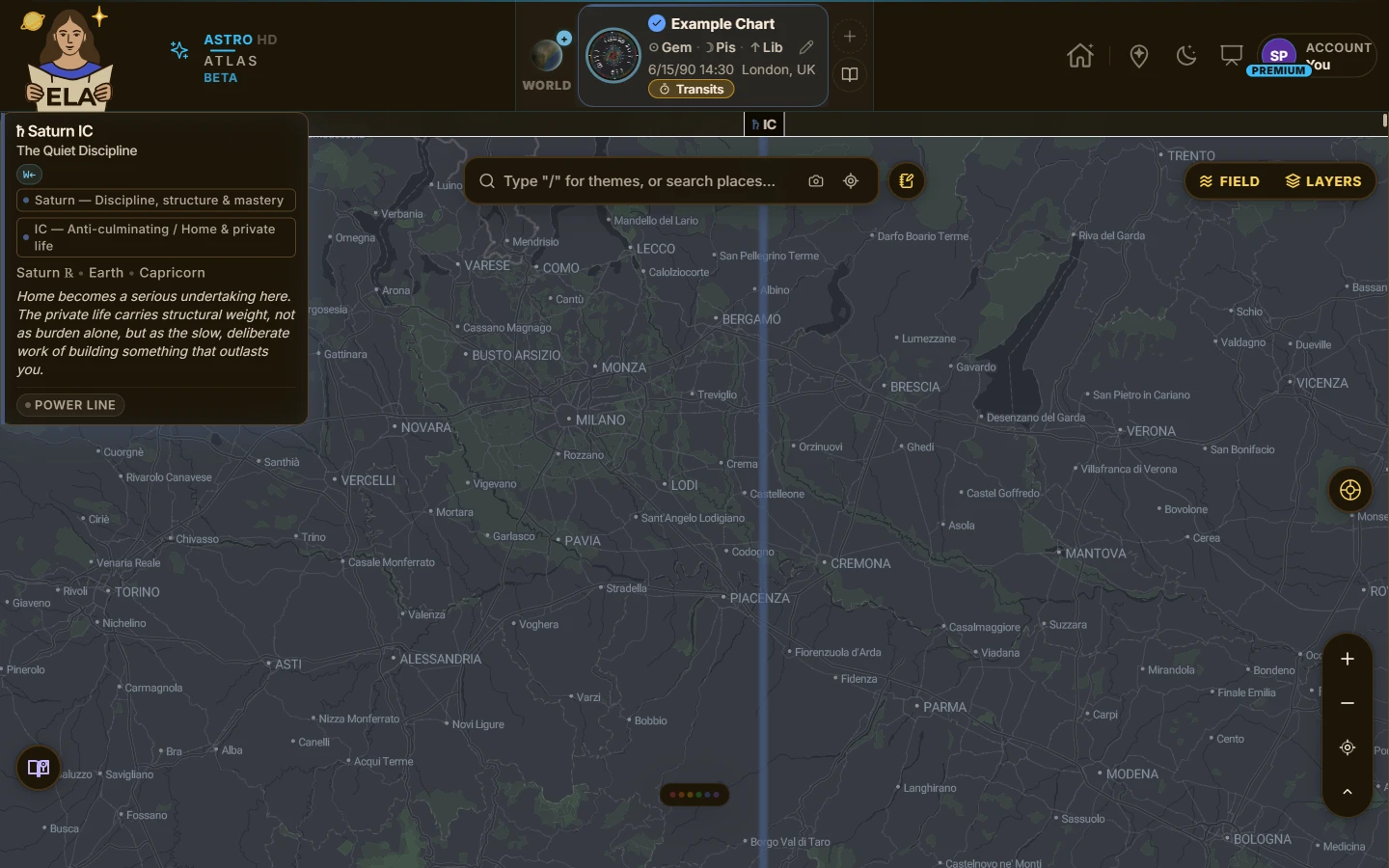
On the map: the same chart, only Saturn showing. Its IC line runs about fifty kilometers east of Milan.
Go the other way and the expand button on the map's chart panel opens that chart in the Lab, carrying the place, the partner or the transit moment you had on screen.
Showing a client
Present clears everything but the chart and goes full screen.
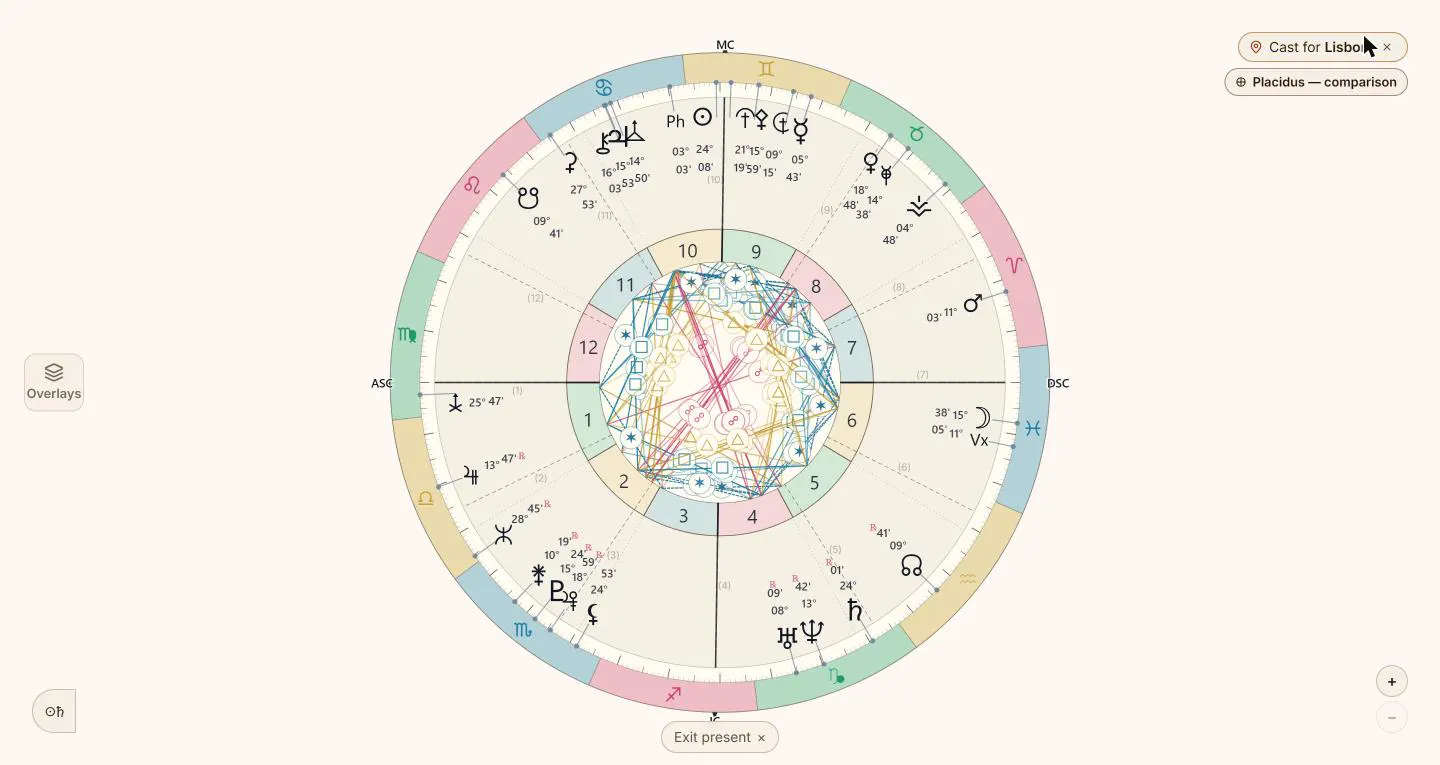
Present: the chart alone, for a screen share or a session. For a guided session across places, the map has Presentation Mode, where you build stops and walk a client through them.
Export the wheel as an image in landscape, square or story shape, to download, copy or share.
Many charts, one room
The Lab keeps your chart library: clients, partners, children, friends, each with a role. Notes attach to any chart, or to any single position in it.
What is free, what is paid
Free opens the Lab. It gets all three faces in 2D and 3D, every natal reading, aspect patterns, notes, today's sky as a second ring, the relocated Ascendant and Midheaven for any city, and one saved chart.
Premium adds the other rings and the clock, the whole relocated chart, fixed stars and lots, the ghost ring, dispositors, profections, the Timing search up to 90 days ahead, every life theme past Love, the Team Map read, more 3D views, and five charts.
Pro adds antiscia, harmonics and draconic, firdaria, zodiacal releasing, the midpoint tree, primary directions, Narrow the time, the amino acid ring, a year of Timing search with more bodies, clean full-size exports, Presentation Mode and unlimited charts. See the plans.
Try it
Open your own chart in the Lab and tap the planet you already know best. Then press the map button. Start here if the map is new to you.
Advanced practitioners will find a great home here, as the chart capabilities are extraordinarily deep. Meticulously crafted.